
Digital Marketing Tools Every Small and Mid-Scale Business Needs to Grow Online
Introduction
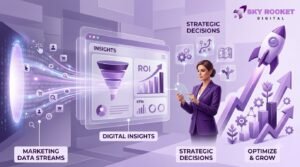
You’ve built a website. You’ve created social media pages. But traffic isn’t flowing, leads aren’t coming, and growth feels stuck.
Here’s what many small and mid-scale business owners discover: having an online presence isn’t the same as having a working online presence.
The difference? The right digital marketing tools.
Without them, you’re essentially marketing in the dark. You don’t know who’s visiting your website, which marketing efforts actually work, or why customers choose your competitors. You’re guessing instead of strategizing. Spending instead of investing. Hoping instead of tracking.
The good news is that you don’t need an enterprise-level budget or a team of specialists to access powerful digital marketing tools. The digital marketing tools landscape has evolved dramatically. Today, small businesses have access to the same tools that major corporations use—many of them available for free or at affordable prices.
But with hundreds of tools available, the challenge isn’t finding tools. It’s finding the right combination of tools that align with your business goals, fits your budget, and doesn’t overwhelm your team.
This guide walks you through the digital marketing tools every small and mid-sized business actually needs to generate visibility, attract leads, understand customers, and drive measurable growth online.
Why Digital Marketing Tools Matter for Small and Mid-Scale Businesses
Before diving into which tools to use, let’s explore why they matter so much for businesses like yours.
Limited Marketing Budgets Require Smart Decisions
Small and mid-scale businesses typically can’t afford to hire large in-house marketing teams or spend freely on advertising. You need to make every dollar count. Digital marketing tools help you allocate budget efficiently by showing which channels, campaigns, and tactics deliver the best return on investment. Instead of wasting money on guesswork, you can base decisions on actual data.
Larger Competitors Are Already Ahead
Big brands have been using digital marketing tools for years. They understand customer behavior online. They’ve optimized their websites for search engines. They track every interaction. If you’re competing without these tools, you’re starting several steps behind.
Digital marketing tools level the playing field. They give you visibility into what’s working, help you identify gaps in your strategy, and enable you to compete effectively even if your budget is smaller.
Customer Behavior Has Changed Fundamentally
Most customers now start their journey online—whether they’re searching Google, scrolling social media, or looking at reviews. If you can’t reach them where they already spend time, you won’t reach them at all.
Digital marketing tools help you:
Show up when customers search for what you offer
Reach the right audience on the right platform at the right time
Understand what customers are looking for
Build relationships through the channels they prefer
You Need to Measure What Actually Works
Marketing without measurement is expensive guesswork. You might be running campaigns that generate no results. You might be investing in channels that don’t reach your ideal customers. You might be missing obvious opportunities to improve.
Digital marketing tools provide the visibility you need to answer questions like:
How many people visit my website each month?
Where are they coming from?
Which pages do they visit?
Are they becoming customers?
What’s my return on ad spend?
Which content gets the most engagement?
Without this data, you’re operating blind. With it, you can make strategic decisions that actually move your business forward.
Automation Saves Time and Increases Consistency
Running a small business means juggling multiple responsibilities. Email marketing, social media, customer follow-ups—it’s easy to let things fall through the cracks or let important tasks slip because you’re too busy managing day-to-day operations.
The right digital marketing tools automate repetitive tasks, ensuring consistency and freeing up your time for strategic work. Email campaigns can be scheduled and triggered automatically. Social media posts can be scheduled in advance. Lead follow-ups can happen without manual intervention. This means your marketing keeps working even when you’re focused on other parts of your business.
Essential Digital Marketing Tools for Small Businesses
Now let’s explore the specific categories of digital marketing tools and how each one serves your business.

1. SEO Tools
If your business relies on customers finding you online, search engine optimization (SEO) is non-negotiable. SEO tools help you understand what people are searching for, whether your website ranks for valuable keywords, and how you compare to competitors.
Key SEO tools:
Google Search Console (Free)
This is where Google tells you directly how your website appears in search results. It shows which keywords bring people to your site, your average search ranking position, which pages get clicks, and which search terms bring traffic but no clicks (an opportunity to improve). Every business should have this installed.
Google Keyword Planner (Free)
Part of Google Ads, this tool shows search volume for keywords you’re interested in. It’s perfect for understanding what your potential customers are actually searching for and identifying keyword opportunities with less competition.
SEMrush (Paid, but offers a free limited version)
SEMrush is a more comprehensive SEO platform that provides keyword research, backlink analysis, technical SEO audits, competitor analysis, and ranking tracking. For businesses that are serious about SEO growth, SEMrush offers depth you won’t find in free alternatives.
Ahrefs (Paid, but offers a free backlink checker)
Like SEMrush, Ahrefs is a powerful SEO platform. It excels at backlink research and competitor analysis. If you’re trying to understand why competitors rank higher than you, Ahrefs provides the answers. The free backlink checker is useful on its own; the full platform is worth considering as your SEO becomes more sophisticated.
Why this matters for your business:
Most online experiences begin with a search. If you’re not visible in search results, you’re losing customers to competitors who are. SEO tools help you capture this traffic by showing you what to optimize, how to do it, and whether your efforts are working.
2. Website Analytics Tools
You can’t improve what you don’t measure. Website analytics tools show you exactly what’s happening on your site: who’s visiting, where they’re coming from, what they do while they’re there, and whether they’re converting to customers.
Key website analytics tools:
Google Analytics 4 (Free)
Google Analytics is essentially the standard. It tracks visitors, traffic sources, user behavior, pages visited, time on site, bounce rate, and conversions. It integrates with Google Ads and Google Search Console. If you have a website and no analytics installed, this should be your first step.
Google Search Console (Free)
While primarily an SEO tool, Search Console also shows analytics about how users find you through search. It’s essential for understanding your organic search traffic.
Looker Studio (Free)
Looker Studio (formerly Data Studio) connects to Google Analytics and other data sources to create custom dashboards and reports. Instead of diving into raw analytics data, you can create clear visualizations of your marketing performance that tell a story and highlight what matters most.
Why this matters for your business:
Analytics answer crucial questions: Is your website bringing in visitors? Where are they coming from? Are they converting? Which pages get the most interest? Without analytics, you can’t tell whether your website is helping or hurting your business. With them, you can optimize based on real data.
3. Local SEO Tools
If your business serves a geographic area—a salon in one city, a restaurant serving a neighborhood, a plumber serving a region—local SEO is where many of your best customers come from.
Key local SEO tools:
Google Business Profile (Free)
Google Business Profile is where local businesses appear on Google Maps and in local search results. When someone searches “restaurants near me” or “plumbers in [your city],” Google Business Profile is what shows up. You can include your address, hours, photos, reviews, and business information. It’s completely free and absolutely essential for local visibility.
Google Maps (Free)
Integral to local search. Customers use Google Maps to find nearby businesses and get directions. Optimizing your Google Business Profile improves how you appear on Maps.
Local keyword research
You can use Google Search Console and Google Keyword Planner to research keywords that include location modifiers. For example, “hair salon in Denver” or “pizza delivery NYC” rather than just “hair salon” or “pizza delivery.” This helps you target customers actively looking for what you offer, in your area.
Review management
Platforms like Google Business Profile, Trustpilot, Yelp, and Facebook all allow customers to leave reviews. More positive reviews boost your local visibility and influence customer decisions. Dedicating time to managing these platforms is important.
Why this matters for your business:
A huge percentage of “near me” searches turn into visits or purchases. Local customers who find you easily are more likely to become customers. If your Google Business Profile is incomplete or outdated, you’re losing local business to competitors who’ve optimized theirs.
4. Social Media Marketing Tools

Social media isn’t just about posting updates. It’s a channel where you build community, engage with customers, boost brand awareness, and drive traffic to your website. Social media marketing tools help you post more efficiently, maintain consistency, analyze performance, and reach the right people.
Key social media marketing tools:
Meta Business Suite (Free)
Meta Business Suite (run by Facebook/Instagram’s parent company) lets you manage your Facebook and Instagram presence from one dashboard. You can schedule posts, reply to messages, see performance metrics, and run ads. If you’re on Facebook and Instagram, this is your hub.
Canva (Free and paid versions)
Canva makes it easy to create professional-looking graphics, social media posts, videos, and promotional content even if you have zero design experience. Templates, stock photos, and simple drag-and-drop design make it possible to create content that looks like it was designed by a professional. For businesses on a budget, Canva is invaluable.
Buffer (Paid, free limited version)
Buffer is a social media scheduling tool. Write your posts once, schedule them for the best times to post, and Buffer publishes them automatically. This saves time and ensures consistent posting even when you’re busy.
Hootsuite (Paid, free limited version)
Similar to Buffer, Hootsuite schedules posts, monitors engagement, and provides analytics for multiple social media accounts. It’s more full-featured than Buffer and useful if you manage multiple social platforms.
Why this matters for your business:
Social media is where your customers spend time. But posting sporadically, without strategy, doesn’t build a presence. Social media marketing tools help you maintain consistency, create quality content, understand what resonates, and measure whether social media is actually driving business results.
5. Content Creation Tools
Creating content regularly is one of the most effective ways to attract customers and build trust. But creating content takes time, especially if you’re trying to do it all yourself. Content creation tools make the process faster and easier.
Key content creation tools:
Canva (Already mentioned, but essential for content)
Canva isn’t just for social media. You can create blog graphics, lead magnets, infographics, presentations, and more. It levels the playing field for small businesses without design budgets.
CapCut (Free)
Video content gets more engagement than static posts, but video editing can be intimidating. CapCut is a free video editing tool that makes it simple to create short-form videos for social media, testimonials, product demos, and more. It handles effects, music, transitions, and subtitles automatically.
Grammarly or similar writing assistants
Grammarly checks grammar, tone, and clarity as you write. Whether you’re writing blog posts, emails, or social media posts, these tools help ensure your writing is professional and polished. A free version is available for basic checking.
AI-assisted content tools
Tools like ChatGPT, Google’s Bard, and other AI writing assistants can help brainstorm content ideas, outline blog posts, write drafts, and overcome writer’s block. The key is that AI is a helper, not a replacement. You still need to review, edit, and ensure accuracy.
Why this matters for your business:
Content builds trust, attracts customers through search engines, and keeps your audience engaged. But creating content requires time and skill. Content creation tools reduce the barrier and make it possible for small teams to produce quality content consistently.
6. Email Marketing Tools
Email remains one of the highest-ROI marketing channels. Email marketing tools help you build email lists, send campaigns, nurture leads, and stay in contact with customers without manual effort.
Key email marketing tools:
HubSpot (Free and paid versions)
HubSpot offers email marketing, landing pages, forms, and CRM (customer relationship management). The free tier is generous for small businesses. It’s also helpful because HubSpot integrates with many other tools.
Mailchimp (Free and paid versions)
Mailchimp started as an email marketing platform and still excels at it. The free version is useful for sending campaigns and automating basic workflows. Paid plans add more automation, advanced analytics, and integrations.
Brevo (Free and paid versions)
Brevo (formerly Sendinblue) is another solid email platform that includes email marketing, SMS, and landing pages. It’s particularly good for automation and segmentation, even in the free version.
Why this matters for your business:
Email lets you stay in touch with customers and nurture leads who aren’t ready to buy yet. A customer email list is an asset you own—unlike social media followers, you’re not dependent on an algorithm. Email marketing tools make it possible to send the right message to the right segment of your audience at the right time, automatically.
7. Paid Advertising Tools
Paid advertising (PPC—pay-per-click) helps you reach customers actively looking for what you offer. Paid advertising tools let you create campaigns, target specific audiences, set budgets, and track return on investment.
Key paid advertising tools:
Google Ads (Paid, but you set the budget)
Google Ads lets you bid on keywords so your ads appear at the top of Google search results when people search for what you offer. You also can display banner ads across websites your customers visit. You only pay when someone clicks your ad. Google Ads includes conversion tracking so you can see exactly what your ads are generating for your business.
Meta Ads Manager (Paid, but you set the budget)
Meta Ads Manager lets you run ads on Facebook and Instagram targeting specific audiences based on interests, demographics, behavior, and more. Meta’s targeting is powerful, making it possible to reach your ideal customers. Like Google Ads, you set your budget and only pay for results.
Google Keyword Planner (Already mentioned, useful for ad planning)
As you plan Google Ads campaigns, Keyword Planner shows search volumes and suggests bid amounts, helping you plan your budget effectively.
Conversion tracking (Meta Pixel, Google conversion tracking)
Both Google and Meta offer tracking pixels. Install these on your website to track what happens after someone clicks your ad. Did they buy? Did they sign up? Did they download something? Conversion tracking shows your actual return on ad spend.
Why this matters for your business:
Organic traffic (from search and social media) takes time to build. Paid advertising gives you immediate visibility while you’re working on long-term organic growth. For businesses with leads or sales to chase, paid advertising can generate results quickly if done strategically.
8. Lead Generation and CRM Tools
Leads are the lifeblood of growing businesses. Lead generation tools help you capture interested prospects. CRM (Customer Relationship Management) systems help you organize, track, and follow up with those leads so they become customers.
Key lead generation and CRM tools:
HubSpot CRM (Free and paid versions)
HubSpot CRM lets you store contact information, track interactions, set reminders for follow-ups, and automate communication. The free version is excellent for small businesses. You can see the entire history of every customer and lead in one place.
Forms and landing pages
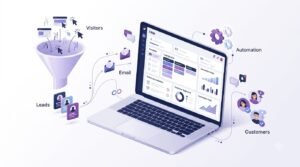
Most email and CRM platforms offer simple form builders and landing page creators. Forms let you capture information from interested visitors. Landing pages (simple web pages designed to convert visitors) help you focus a visitor’s attention on one offer.
Meta Lead Ads (Part of Meta Ads Manager)
Meta Lead Ads let people submit their contact information without leaving Instagram or Facebook. This reduces friction and increases lead capture from social media.
WhatsApp Business (Free)
WhatsApp Business is a messaging app that many businesses use to communicate with customers. In some markets, it’s as important as email. WhatsApp Business integrates with many CRM systems for tracking conversations.
Specialized CRM systems (Pipedrive, Zoho, etc.)
As your business grows, you might need a more sophisticated CRM. Systems like Pipedrive specialize in sales pipeline management, helping teams track deals and forecast revenue. Zoho offers affordable all-in-one business software.
Why this matters for your business:
Not every visitor becomes a customer immediately. Lead generation tools help you capture interested prospects. CRM tools ensure that no lead falls through the cracks. With proper lead management, customers that weren’t ready to buy today can become customers tomorrow.
9. Marketing Automation Tools
Marketing automation means letting tools do the repetitive work so your team can focus on strategy and relationships.
What marketing automation can do:
Email automation: Send welcome sequences, product recommendations, abandoned cart reminders, or educational series automatically based on customer behavior.
Lead scoring: Automatically identify which leads are most engaged and ready to buy.
Workflow automation: Trigger actions based on customer behavior (e.g., when someone downloads a lead magnet, automatically send them a follow-up email).
Social media workflow: Schedule posts, automatically post to multiple platforms, and gather engagement metrics.
Customer communication: Automatically send reminders, confirmations, and updates.
Data synchronization: Automatically move data between tools so information stays current across your systems.
Why this matters for your business:
Manual marketing tasks are time-consuming and often fall through the cracks when you’re busy running your business. Automation ensures consistency and frees your team to do higher-level work that requires human judgment and creativity. Even simple automation—like sending a thank-you email the moment someone completes a purchase—can dramatically improve customer experience and conversion rates.
Best Digital Marketing Tools by Business Need

Different businesses have different priorities. Here’s a quick reference guide for which tools to focus on based on your immediate goals:
| Business Goal | Recommended Tools | What They Help With |
| Increase Google visibility | Google Search Console, SEMrush or Ahrefs, Google Keyword Planner | Keyword research, technical SEO, backlink analysis, ranking tracking, competitor research |
| Improve local search | Google Business Profile, Google Maps, local SEO research tools | Local visibility, reviews, Google Maps ranking, local keyword targeting |
| Generate leads | HubSpot, Mailchimp, landing page builders, forms | Lead capture, email follow-ups, lead management, nurturing |
| Manage social media | Meta Business Suite, Canva, Buffer or Hootsuite | Post scheduling, content creation, engagement tracking, analytics |
| Create content | Canva, CapCut, Grammarly, AI writing assistants | Graphics, videos, blog posts, social media posts, professional appearance |
| Run paid ads | Google Ads, Meta Ads Manager, conversion tracking | Reach targeted audiences, immediate visibility, conversion tracking, ROI measurement |
| Send email campaigns | HubSpot, Mailchimp, Brevo | Newsletters, lead nurturing, customer communication, automation |
| Track website visitors | Google Analytics 4, Looker Studio | Traffic sources, user behavior, page performance, conversion tracking |
| Measure conversions | Google Analytics 4, conversion pixels (Meta Pixel, Google) | Understanding what marketing activities drive business results |
| Manage customers | HubSpot CRM, Pipedrive, Zoho | Storing information, tracking interactions, follow-ups, sales forecasting |
Free vs. Paid Digital Marketing Tools
One of the biggest questions small business owners ask: Do I need to pay for tools, or can I build a complete marketing system with free tools?
The honest answer: It depends on your goals, time, and budget.
Tools That Are Great Free Options
Google Analytics 4 — Free and comprehensive. Even enterprise companies use it. If you only use one analytics tool, this is it.
Google Search Console — Free and essential. You get data straight from Google about your search visibility.
Google Keyword Planner — Free and surprisingly useful for keyword research.
Google Business Profile — Free and critical for local businesses.
Meta Business Suite — Free for posting, scheduling, and basic analytics.
Canva — The free version is actually very good. You can create professional graphics without paying.
HubSpot CRM — The free version offers solid CRM functionality for small teams.
CapCut — A powerful video editing tool that’s completely free.
Mailchimp — The free version handles hundreds of email subscribers and basic automation.
Buffer — The free version lets you schedule social posts, though the paid version offers more analytics.
When Free Isn’t Enough
As your business grows or your marketing becomes more sophisticated, you may outgrow free tools:
Google Analytics 4 is free, but if you need real-time dashboards, advanced analytics, or data integration that Google Analytics doesn’t provide, you may need a more specialized analytics tool.
Canva’s free version covers most needs, but the paid version unlocks more templates, brand kit features, and advanced design options that speed up your workflow.
Email marketing tools are free at small subscriber counts, but paid plans unlock better automation, advanced segmentation, and deliverability optimization that matter when you have thousands of subscribers.
SEO tools like SEMrush and Ahrefs are paid because they track vast amounts of keyword and backlink data. Google’s free tools are good for basics, but if you’re competing in competitive industries, paid SEO tools show you opportunities free tools miss.
Paid advertising requires a budget by definition, but the budget is separate from the tool cost. Google Ads and Meta Ads Manager don’t charge for using the platform; you pay for the ads you run.
Smart Approach to Tool Spending
Start with free: Use free versions of tools as you learn and prove value.
Measure before upgrading: Before paying for a tool, make sure the free version actually generates results for your business.
Prioritize: If you can only afford a few paid tools, invest in the ones that directly impact revenue (ads, CRM, email marketing).
Avoid subscription sprawl: It’s easy to accumulate subscriptions that you stop using. Audit your tools quarterly and cut anything that isn’t providing value.
Negotiate: Some tools offer discounts for annual payments or for small businesses. It’s worth asking.
A Simple Digital Marketing Tool Stack for Small Businesses
You don’t need twenty tools. In fact, too many tools create confusion and waste. Here are practical starter stacks based on business type.
Local Service Business (Plumber, Salon, Cleaning, etc.)
Essentials:
Google Business Profile (free) — So customers find you locally
Google Analytics 4 (free) — To track if customers find your website
Canva (free) — To create professional-looking posts
Meta Business Suite (free) — To post on Facebook/Instagram regularly
Mailchimp (free) — To email past customers occasionally
Google Search Console (free) — To monitor search visibility
Optional as you grow:
HubSpot (free CRM) — To track customer interactions
Google Ads (paid, set your budget) — For targeted local ads during busy seasons
Why this stack works: Local businesses primarily need to be found locally and maintain relationships with repeat customers. This stack handles both without significant cost.
E-commerce Business (Online Store)
Essentials:
Google Analytics 4 (free) — To track traffic and conversions on your store
Google Ads (paid) — To drive traffic to products
Meta Ads Manager (paid) — To reach customers on Facebook/Instagram
Google Business Profile (free) — To appear in local/Google searches
HubSpot or Mailchimp (free) — To email customers and encourage repeat purchases
Canva (free) — To create product graphics and promotional images
Optional as you grow:
Conversion tracking pixels (free) — To understand which ads drive sales
SEMrush or Ahrefs (paid) — To optimize product listings for search
Why this stack works: E-commerce relies on driving traffic and converting visitors. This stack gives visibility, targets the right people, and maintains customer relationships.
Restaurant or Café
Essentials:
Google Business Profile (free) — For location, hours, menus, online ordering
Google Analytics 4 (free) — To track website traffic and reservations
Meta Business Suite (free) — To post daily specials and seasonal items
Canva (free) — To create attractive graphics of menu items
Review management (free) — Monitor reviews on Google, Yelp, Facebook
Optional as you grow:
Google Ads (paid) — Local advertising during busy seasons
Email marketing (free) — Build a loyalty list and send promotions
WhatsApp Business (free) — Direct messaging for reservations/orders
Why this stack works: Restaurants rely on local discovery and repeat customers. This stack maximizes local visibility and helps customers find information they need (hours, menu, location).
Startup or Personal Brand
Essentials:
Website with Google Analytics 4 (free) — Core hub
Google Search Console (free) — Understand search traffic
Blog platform or Medium (free) — Publish content
Meta Business Suite (free) — Build audience on social
Canva (free) — Create content graphics
Mailchimp (free) — Build email list
Optional as you grow:
LinkedIn articles or newsletter — Thought leadership
Google Ads or LinkedIn ads (paid) — Accelerate growth
HubSpot (free) — Manage leads and inquiries
Why this stack works: Startups and personal brands need visibility, audience building, and credibility. This stack focuses on content, audience growth, and relationship building with minimal cost.
Digital Marketing Tool Stack for Mid-Scale Businesses
As your business grows, your marketing needs become more sophisticated. Mid-scale businesses typically need more robust analytics, better lead management, integrated workflows, and deeper insights.
What Changes as You Scale
From basic analytics to integrated dashboards:
A growing business needs more than “how many people visited.” You need to understand acquisition channels, customer lifetime value, which campaigns drive profitable customers, and forecasting. Looker Studio combined with Google Analytics creates custom dashboards that tell your specific business story.
From simple CRM to sophisticated lead management:
Scaling businesses need to track deals, forecast revenue, manage team performance, and automate follow-ups. A robust CRM like Pipedrive, HubSpot (paid tier), or Zoho becomes essential.
From manual workflows to marketing automation:
Mid-scale businesses have enough volume that manual processes break down. Marketing automation ensures consistent communication, timely follow-ups, and personalized experiences at scale.
From scattered tools to integrated systems:
When you have multiple tools, data gets siloed. A mid-scale business benefits from integration: when someone fills out a form, they’re automatically added to your CRM and email list. When they make a purchase, the event records in Analytics. Data flows between systems automatically.
From vanity metrics to strategic metrics:
Growth-focused businesses track metrics that matter: customer acquisition cost, customer lifetime value, conversion rates, marketing ROI. This requires analytics tools that go deeper than “pageviews.”
Advanced SEO and paid advertising:
Competitive markets require sophisticated SEO and ad strategies. Tools like SEMrush, Ahrefs, and optimized Google Ads campaigns become essential for sustained visibility.
Suggested Mid-Scale Tool Stack
Core platform: HubSpot (paid tier) — Central hub for CRM, email marketing, landing pages, and marketing automation
Analytics: Google Analytics 4 + Looker Studio + conversion tracking pixels — Comprehensive view of customer journey
SEO and content: SEMrush or Ahrefs (paid) — Competitive keyword tracking, backlink analysis, content optimization
Paid advertising: Google Ads + Meta Ads Manager + sophisticated conversion tracking — Reach and ROI measurement
Social media: Meta Business Suite (free) + dedicated scheduler if needed + social listening tools — Community management and engagement
Content creation: Canva, CapCut, Grammarly — Maintaining content quality at scale
Email and marketing automation: HubSpot or specialized email platform — Sophisticated segmentation and automation
CRM and lead management: HubSpot CRM (paid) or Pipedrive — Structured lead management and sales forecasting
The difference at this scale isn’t just having more tools. It’s having an *integrated system* where data flows freely, analytics inform strategy, and processes scale without requiring more manual work.
How to Choose the Right Digital Marketing Tools
With hundreds of tools available, how do you know which ones to choose?
Use this framework:
Step 1: Define Your Business Goal
What’s the primary problem you’re trying to solve?
Not enough website traffic?
Leads coming in but not converting?
No social media presence?
Can’t track marketing performance?
Need to scale customer communication?
Write down your top 1-3 goals. This clarity prevents you from getting distracted by tools that solve problems you don’t have.
Step 2: Identify Your Target Audience
Where does your ideal customer spend time?
Searching Google?
On Facebook or Instagram?
Looking for local businesses?
Checking email?
Browsing industry communities or forums?
Your audience determines your channels, which determines your tools.
Step 3: Determine Your Marketing Channels
Based on where your audience is, which channels should you focus on?
Organic search?
Local search?
Social media?
Email?
Paid advertising?
Content marketing?
You might focus on 2-4 channels initially, not every possible channel.
Step 4: Set a Realistic Budget
How much can you actually spend on marketing tools?
$0 (free tools only)?
$50-200 per month?
$500+ per month?
This determines which tools are realistic options. A five-person team might justify a $500/month HubSpot subscription, but it’s overkill for a solo entrepreneur just starting out.
Step 5: Select Essential Tools
Based on your goals, audience, channels, and budget, identify 5-8 essential tools. Don’t start with 20. Start focused.
For most small businesses, this includes:
Website analytics (Google Analytics 4)
A tool for your primary marketing channel (social media scheduler, email platform, or SEO tool)
A tool for content (Canva)
Basic CRM or lead management
Optional: Paid advertising platform if budget allows
Step 6: Connect Tracking and Analytics
This is crucial and often overlooked. Install conversion tracking so you understand what marketing activities actually drive business results.
Install Google Analytics 4 on your website
Install conversion pixels from Meta and Google
Set up goal tracking in Google Analytics
Connect your advertising platforms to your analytics
Without this, you’re flying blind.
Step 7: Measure Results
Give each tool 30-90 days to prove value. What are you measuring?
Traffic increased?
Leads captured?
Customer acquisition cost?
Email open rates?
Social engagement?
Conversion rate?
Track these metrics consistently.
Step 8: Replace Tools That Aren’t Providing Value
If a tool costs money and isn’t delivering results, cancel it. Tool sprawl—accumulating subscriptions you don’t use—is one of the biggest wastes small businesses make.
If a free tool isn’t helping, stop using it and redirect your effort to channels that work.
Common Digital Marketing Mistakes Small Businesses Should Avoid
Most small business owners don’t have formal marketing training. It’s easy to make expensive mistakes. Here are the ones I see repeatedly:
1. Using Too Many Tools Without a Strategy
Shiny tool syndrome is real. A business owner hears about a new social media platform, a new analytics tool, a new email service, and signs up for all of them. Soon they’re paying for ten subscriptions, using three of them, and overwhelmed by the complexity.
Solution: Be intentional. Choose tools that specifically solve your identified problems. More tools = more complexity = harder to see results.
2. Buying Expensive Software Without a Strategy
“Let’s get HubSpot.” “Let’s use SEMrush.” Maybe those tools are right for you. Maybe they’re not. Buying enterprise software without knowing your strategy is like buying a Ferrari when you need a pickup truck.
Solution: Start with free or cheap tools. Understand your business problem first. Then invest in premium tools that actually solve that specific problem.
3. Not Installing Analytics
Shocking how many websites have no analytics installed. They’re just guessing whether marketing works.
Solution: Install Google Analytics 4 today. It’s free. It takes 10 minutes. It’s the foundation of understanding whether your marketing actually works.
4. Not Tracking Conversions
Having traffic is great. But is it bringing customers? If you’re not tracking conversions, you don’t know.
Solution: Set up conversion tracking immediately. Define what a conversion is for your business (sale, lead form submission, phone call, email signup) and track it.
5. Ignoring SEO
Businesses spend money on paid ads but neglect SEO. Paid ads stop working the moment you stop paying. Organic search compounds over time.
Solution: Allocate effort to SEO alongside paid advertising. At minimum, claim your Google Business Profile, set up Google Search Console, and create content that addresses customer questions.
6. Posting Without Strategy
Posting once a week to social media without a plan rarely builds an audience. Random content doesn’t drive results.
Solution: Develop a content strategy. What topics matter to your audience? What content will they engage with? Plan 4-8 weeks of content in advance. Consistency beats perfection.
7. Running Ads Without Proper Tracking
Setting up Google Ads or Meta Ads but not connecting conversion tracking means you don’t know your return on investment. You’re essentially gambling.
Solution: Before running ads, set up conversion tracking. Understand your customer journey. Only then do ads make financial sense.
8. Not Following Up with Leads
Lead capture is only half the battle. If you capture leads but don’t follow up, most become lost opportunities. Most sales happen after the initial contact.
Solution: Use automation or CRM to ensure every lead gets follow-up. A simple email sequence after a form submission often turns interested prospects into customers.
9. Focusing Only on Vanity Metrics
“We have 5,000 social media followers!” But are those followers buying? Followers don’t pay bills. Customers do.
Solution: Track metrics that matter: leads captured, customers acquired, revenue generated, customer acquisition cost. These metrics tie marketing activity to business results.
10. Not Reviewing Performance Regularly
Set up analytics, run campaigns, but never look at performance. Months go by and you don’t know whether anything is working.
Solution: Review key metrics monthly. Are you hitting your goals? Are certain channels underperforming? Adjust based on what the data shows.
How Skyrocket Digital Can Help Your Business
You now understand the digital marketing tools landscape. You know which tools matter, why they matter, and how to choose them.
But having the tools is different from using them effectively.
Many business owners feel overwhelmed:
Which tool should I implement first?
How do I set up analytics correctly?
How do I know if I’m tracking the right metrics?
Should I invest in paid advertising yet?
Is my content strategy actually working?
Am I spending money on the right channels?
This is where a digital marketing partner makes a real difference.
Skyrocket Digital helps small and mid-scale businesses:
Build your digital marketing strategy — We don’t just implement tools. We work with you to understand your business goals, your customers, and your competitive landscape. Then we recommend which tools and channels will actually drive results for your specific situation.
Set up the right tools correctly — Analytics, conversion tracking, CRM, email automation—many businesses have these tools but set them up incorrectly. We ensure your tools are configured to give you accurate insights and automate what should be automated.
Create an integrated marketing system — Rather than tools working in silos, we connect them so data flows seamlessly. Lead capture connects to your CRM. Sales connect to your analytics. Everything tells one cohesive story of your marketing performance.
Develop content and messaging — Tools are just infrastructure. The strategy—what to say, where to say it, when to say it—drives results. We develop content strategies and messaging that actually resonate with your audience.
Execute and optimize — We don’t just plan and leave. We implement campaigns, monitor performance, and continuously optimize based on data. This iterative approach turns marketing investment into actual business growth.
Train your team — We make sure your team understands not just which tools to use, but why and how to use them strategically. This builds capability within your organization.
Provide clarity on ROI — At the end of the day, marketing needs to generate business results. We focus on metrics that matter: leads, customers, revenue. We show you exactly what your marketing investment is generating.
The Skyrocket Digital Difference
Small businesses often feel like they’re competing with corporate marketing departments. They don’t have the budget for large agencies. They don’t have the internal expertise to figure everything out.
Skyrocket Digital bridges that gap.
We specialize in helping businesses like yours—small and mid-scale companies that take their digital presence seriously but need expert guidance and execution.
Unlike corporate agencies that treat you as one project among hundreds, we partner with businesses for sustainable, long-term growth. We understand that small businesses need practical solutions, not theoretical strategies. We focus on actions that generate measurable results.
Whether you’re starting your digital marketing journey or looking to optimize an existing strategy, Skyrocket Digital can help.
Next Steps
Ready to grow your business online?
Visit Skyrocket Digital at https://sky.digital/ to learn more about how we help businesses like yours build effective digital marketing strategies.
Or start today with these free steps:
Install Google Analytics 4 on your website
Claim your Google Business Profile
Set up Google Search Console
Define your top 3 marketing goals
Identify which channels your customers actually use
These foundations cost nothing but create the clarity you need to make smart marketing decisions.
The tools are available. The knowledge is accessible. What separates businesses that grow from those that don’t is having a clear strategy and executing consistently.
That’s where Skyrocket Digital comes in. Let’s help you skyrocket your business online.
Conclusion
Digital marketing tools aren’t a luxury anymore. They’re a necessity for small and mid-scale businesses that want to compete online.
But it’s not about having the most tools. It’s about having the right tools, using them strategically, and measuring results.
Start with the basics: Google Analytics 4, Google Business Profile, Google Search Console, and a content creation tool like Canva. Build your understanding of how your customers find you online. Then add tools that specifically address your identified gaps.
Remember:
Not every tool is right for every business
Free tools can get you surprisingly far
Tracking matters more than having the fanciest tool
Integration beats isolation
Strategy beats random effort
Consistent execution beats perfection
The small businesses that are growing online aren’t using more expensive tools than their competitors. They’re using tools more strategically and measuring what matters.
You have access to the same tools. Now it’s about using them smarter.
Skyrocket Digital specializes in helping small and mid-scale businesses build effective digital marketing strategies and execute them for measurable growth. If you’re ready to take your online presence seriously, let’s talk. Visit https://sky.digital/ today.